Disclaimer: This article is for educational purposes only. The techniques described should only be used on systems you own or have explicit permission to test. Unauthorized access to version control systems is illegal.
Hi everyone, I hope you're all doing well. This is my first article, and I hope my writing can be a reference for you all.
It all started when I was browsing the internet to find information related to universities.
I came across a website, let's call it www.site.ac.id. I decided to perform a
small directory scan using dirsearch to explore the website structure.

Educational institution website undergoing security assessment
Understanding Git Directory Exposure
Before diving into the technical details, let me explain what a .git directory exposure vulnerability is:
The .git directory contains the entire version control history of a project,
including source code, configuration files, commit history, and potentially sensitive
information like database credentials, API keys, and other secrets that developers may have
accidentally committed.
When this directory is accessible via web browsers, it creates a significant security risk as attackers can download the entire repository and analyze it for sensitive information.

Git version control system containing sensitive project data
Directory Scanning with Dirsearch
I began by performing directory enumeration using dirsearch, a popular web path scanner that helps identify hidden directories and files on web servers.
                                # Directory scanning command

                                python3 dirsearch.py -u www.site.ac.id --full-url
This command performs the following actions:
- -u: Specifies the target URL
- --full-url: Shows complete URLs in the output
- Wordlist scanning: Tests common directory and file names
- HTTP status analysis: Identifies accessible resources
Discovery: The scan revealed the presence of a .git
directory, which immediately caught my attention as a potential security vulnerability!
Dirsearch tool revealing exposed .git directory
Initial Manual Investigation
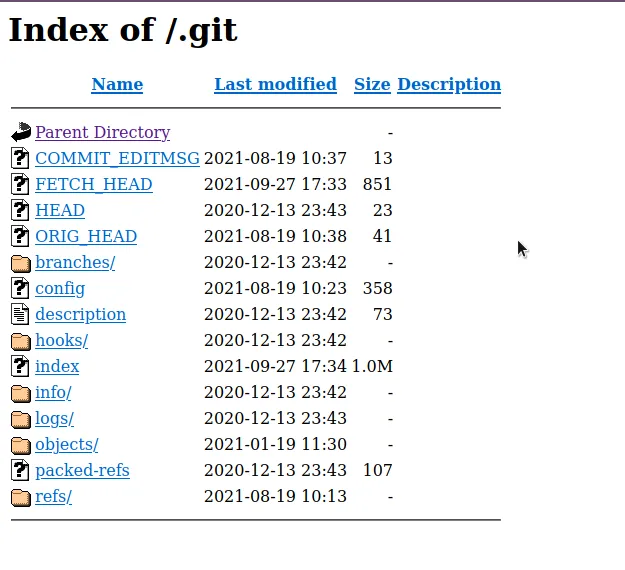
After discovering the .git directory, I attempted to access it directly through
the browser to understand the extent of the exposure:
                                # Accessing the exposed directory

                                https://www.site.ac.id/.git/
Upon manual inspection through the browser, I didn't immediately find anything that I considered highly sensitive in the directory listing. However, I knew that the real treasure often lies deeper within the Git repository structure.
Common Git Directory Structure
A typical .git directory contains:
- HEAD: Points to the current branch
- config: Repository configuration settings
- objects/: Git objects (commits, trees, blobs)
- refs/: Reference information (branches, tags)
- logs/: Commit history and reflog
- index: Staged changes information
Advanced Exploitation with Git-Dumper
Realizing that manual browsing might not reveal all the sensitive information, I decided to
use git-dumper, a specialized tool designed to download and reconstruct Git
repositories from exposed .git directories.
About Git-Dumper
Git-dumper is a powerful tool that:
- Reconstructs repositories: Downloads the entire Git history
- Recovers deleted files: Accesses files from previous commits
- Extracts sensitive data: Finds credentials and configuration files
- Analyzes commit history: Reviews development patterns and changes
                                # Git repository extraction command

                                git-dumper www.site.ac.id/.git dump-site.ac.id
This command structure:
- www.site.ac.id/.git: Source URL of the exposed Git directory
- dump-site.ac.id: Local destination folder for the extracted repository
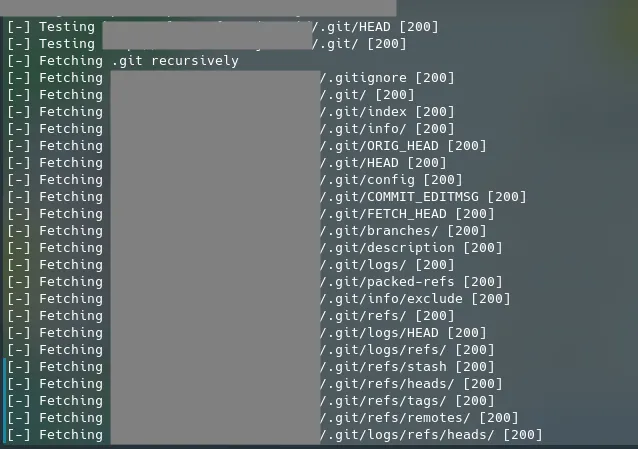
Git-dumper tool extracting repository data
Critical Discovery
After waiting for a short while, git-dumper completed its extraction process. The results were more significant than I initially anticipated:
Major Finding: I successfully obtained database backup files from the website www.site.ac.id! This included sensitive configuration data and potentially confidential information.
What I Found
The extracted repository contained:
- Database backup files: SQL dumps with potentially sensitive data
- Configuration files: Database connection strings and API credentials
- Source code: Complete application codebase with logic vulnerabilities
- Commit history: Development patterns and sensitive information in commits
- Environment files: Production and staging environment configurations
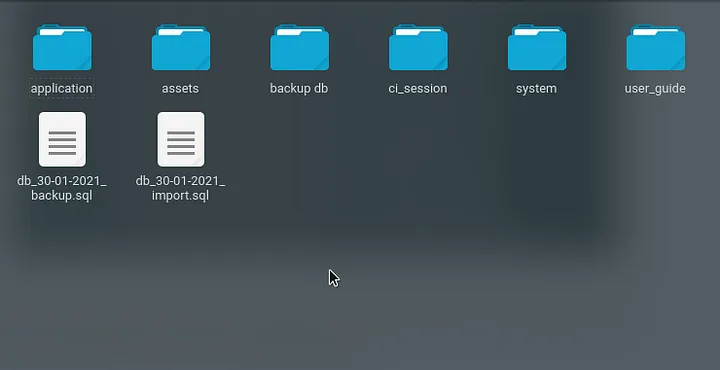
Database backup files containing sensitive university data
Impact Assessment
This vulnerability had serious security implications:
Data Exposure Risks
- Student Information: Personal data, academic records, contact details
- Staff Credentials: Login information and administrative access
- System Configuration: Database connections, API keys, server details
- Financial Data: Payment information and transaction records
- Intellectual Property: Proprietary code and business logic
Potential Attack Vectors
- Data Breach: Mass extraction of personal information
- Credential Harvesting: Administrative password extraction
- System Compromise: Using exposed configuration for further attacks
- Social Engineering: Using personal data for targeted attacks

Potential impact of exposed Git repository on data security
Technical Analysis
How Git Directory Exposure Occurs
This vulnerability typically happens when:
- Deployment Misconfiguration: Entire project folder deployed including
.git - Web Server Misconfiguration: Missing rules to block access to
.gitdirectory - CI/CD Pipeline Issues: Automated deployment without proper filtering
- Developer Oversight: Lack of awareness about Git directory exposure risks
Common File Types Found in Exposed Git Repositories
                                # Sensitive files commonly found:

                                .env # Environment variables

                                config.php # Database configurations

                                settings.py # Application settings

                                database.sql # Database backups

                                credentials.json # API keys and tokens

                                private_key.pem # SSH/SSL private keys
Responsible Disclosure Process
Following ethical hacking principles, I immediately initiated responsible disclosure with the university's IT security team.
Timeline
                                📅 April 20, 2022: Sent vulnerability report to site.ac.id

                                ✅ April 30, 2022: University responded and validated the bug

                                🏆 May 2, 2022: Received certificate of appreciation as reward
Note: The development team gave me permission to disclose this report without mentioning their specific details or institutional identity.
Prevention and Remediation
To prevent Git directory exposure vulnerabilities, organizations should implement:
Web Server Configuration
                                # Apache .htaccess rule

                                <DirectoryMatch "\.git">

                                  Require all denied

                                </DirectoryMatch>


                                # Nginx configuration

                                location ~ /\.git {

                                  deny all;

                                  return 404;

                                }
Deployment Best Practices
- Clean Deployment: Deploy only necessary application files
- .gitignore Usage: Properly configure ignored files and directories
- CI/CD Filtering: Exclude version control directories from deployment
- Regular Audits: Periodic security assessments of deployed applications
Development Security
- Secret Management: Use proper secret management tools
- Environment Separation: Keep development and production configurations separate
- Commit Hygiene: Regularly review commits for sensitive information
- Pre-commit Hooks: Automated checks for sensitive data before commits
Tools and Techniques Summary
Discovery Tools
- Dirsearch: Directory and file enumeration
- Dirb: Alternative directory scanner
- Gobuster: Fast directory/file brute-forcer
- Manual Testing: Browser-based exploration
Exploitation Tools
- Git-dumper: Git repository extraction
- GitTools: Suite of Git exploitation tools
- Git-extract: Alternative repository extraction tool
- Manual Git commands: Custom repository reconstruction
Analysis Techniques
- Commit History Analysis: Reviewing development patterns
- File Content Search: Looking for sensitive strings and patterns
- Configuration Review: Analyzing setup and environment files
- Credential Extraction: Identifying hardcoded passwords and keys
Lessons Learned
This bug bounty experience taught me several valuable insights:
- Simple Vulnerabilities Matter: Basic misconfigurations can lead to significant data exposure
- Automated Tools are Essential: Manual testing alone might miss critical findings
- Git Repositories are Goldmines: Version control systems often contain the most sensitive information
- Educational Institutions: Often have valuable data but may lack robust security measures
- Responsible Disclosure Works: Professional reporting builds trust and leads to positive outcomes

Continuous learning and improvement in cybersecurity research
Detection and Monitoring
Organizations should implement monitoring systems to detect potential Git directory exposure:
Automated Detection
- Web Scanners: Regular vulnerability assessments
- Penetration Testing: Periodic security evaluations
- Bug Bounty Programs: Crowdsourced security testing
- Security Monitoring: Real-time threat detection systems
Manual Verification
                                # Quick manual checks for Git exposure

                                curl -I https://example.com/.git/

                                curl -I https://example.com/.git/config

                                curl -I https://example.com/.git/HEAD


                                # Look for HTTP 200 responses indicating accessibility
Industry Impact and Statistics
Git directory exposure is more common than many organizations realize:
- Common Vulnerability: Found in approximately 0.2% of all websites
- High Impact: Often leads to complete source code and database exposure
- Easy Exploitation: Requires minimal technical skills to exploit
- Wide Scope: Affects organizations of all sizes and industries
Real-World Examples
This type of vulnerability has affected numerous high-profile organizations:
- Educational Institutions: Student data and academic systems exposed
- Government Agencies: Sensitive configuration and citizen data leaked
- Financial Services: Payment processing code and customer information exposed
- Healthcare Organizations: Patient data and medical system configurations revealed

Git directory exposure affecting organizations worldwide
Future Research Directions
This discovery opens up several areas for further security research:
- Automated Git Mining: Tools for mass Git repository analysis
- Sensitive Data Detection: Machine learning for credential identification
- Historical Analysis: Long-term commit history vulnerability assessment
- Cross-Repository Correlation: Finding connections between exposed repositories
Conclusion
This bug bounty experience demonstrates how a simple directory misconfiguration can lead to
significant data exposure. The discovery of an accessible .git directory on a
university website resulted in the extraction of database backup files and sensitive
configuration information.
Key takeaways from this investigation:
- Basic Security Matters: Simple misconfigurations can have serious consequences
- Proper Deployment is Critical: Version control directories should never be accessible in production
- Automated Tools Enhance Discovery: Specialized tools like git-dumper can reveal hidden sensitive data
- Responsible Disclosure Benefits Everyone: Ethical reporting helps improve overall security
For security researchers, this case study shows the importance of thorough investigation even when initial manual analysis doesn't reveal obvious vulnerabilities. Often, the most valuable information requires deeper analysis using specialized tools.
For developers and system administrators, this serves as a reminder to implement proper deployment practices and regularly audit public-facing systems for exposed sensitive directories and files.

Implementing comprehensive security practices to prevent data exposure
Maybe that's all from me, hopefully this can be a reference for you all and sorry if there are things that are not clear. I'm RyuuKhagetsu, see you in the next article.